How to translate an app screen on Android
When an app is in a language you do not read, translating the words is only part of the problem. You may also need to know what a button changes or which choice matches your goal.
MondoCue is an AI screen guide for unfamiliar apps. Choose the screen you want help with, then review a translation, an explanation of visible choices, and suggested next steps in your selected language. You stay in control of every action in the original app.
Use MondoCue on an unfamiliar screen
- Install the Android 11+ app and sign in. MondoCue is currently distributed as a direct APK download, not through Google Play.
- Choose your response language. The app supports 40 response languages.
- Enable the floating guide. Follow Android's screen-capture accessibility disclosure in the app.
- Open the app page you want to understand. Tap the floating MondoCue guide when you are ready to analyze that screen.
- Review the explanation before acting. Compare important details with the original app and decide what to do yourself.
Example: understand a language-change prompt
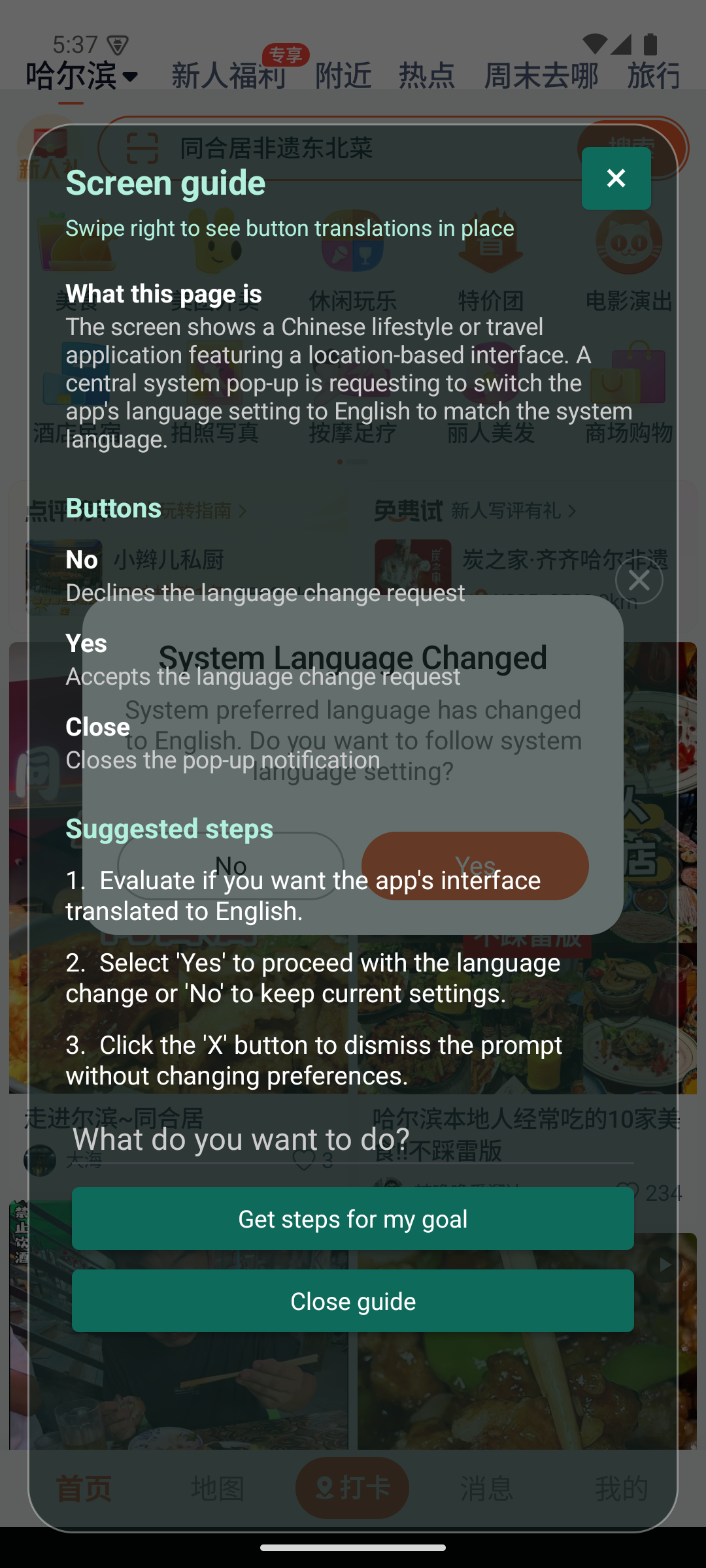
This Android demonstration shows MondoCue explaining a system-language prompt displayed inside a Chinese local-services app. It identifies what the prompt is asking and explains the visible “Yes” and “No” choices, so the user can decide whether to change the app's language preference.
What an Android screen translator can and cannot do
MondoCue analyzes a screen after you tap the guide. It can translate visible text and explain the context of page choices, but it does not continuously scan other apps, tap buttons, place orders, make payments, or verify that a booking succeeded.
The screen you choose is sent to MondoCue's server and an AI provider for analysis. Some apps block screen capture, and an AI explanation may be wrong or incomplete. Check names, amounts, dates, permissions, routes, and other important details in the original app. Do not analyze screens with passwords, payment details, private messages, or other information you do not want processed. See the Privacy Policy for screen-processing details.
Common questions
Does MondoCue translate every app automatically?
No. You tap the floating guide to choose when a screen is analyzed. Some apps or secure pages restrict capture, so not every screen can be processed.
Can MondoCue choose an option or finish a task for me?
No. It explains the screen and suggests a next step. You review the original app and make every decision yourself.
Can I use it while traveling in China?
Yes. MondoCue can help explain screens in Chinese apps when Android allows the screen to be captured. See the China travel screen guide for travel examples and limitations.
Is the iPhone app available?
The iPhone app and its screenshot, Shortcut, and live-assistant workflows are still in testing and are not available for public download.